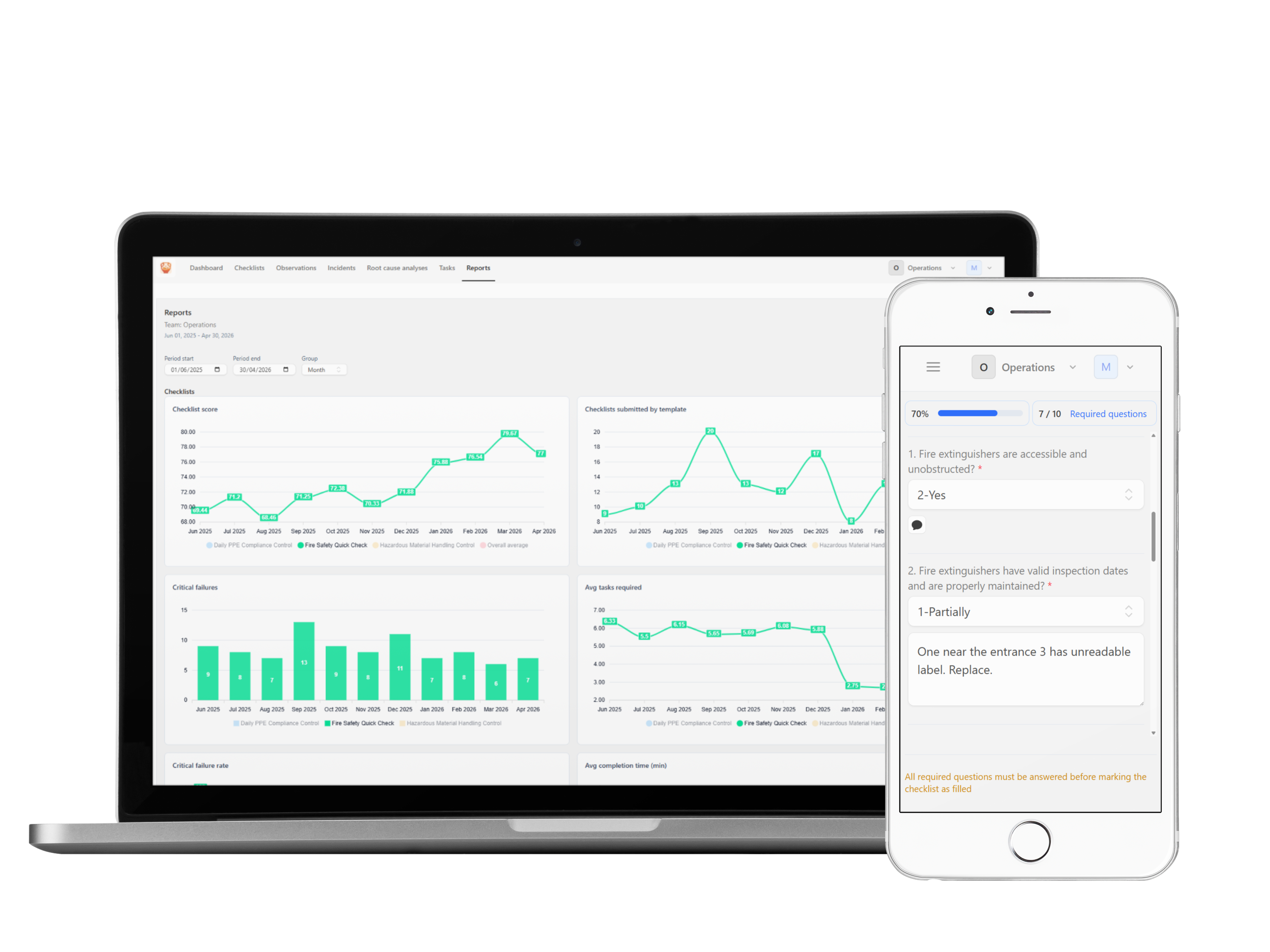
Move from reactive problem solving to proactive improvement
Observations management system might be most underrated tool for operational excellence. Even though there might be multiple signals that something is wrong, without a structured process to capture and analyze those signals, teams will always be one step behind. Problems are noticed only when they become big issues. Amphory observations module is designed to help teams move from reactive problem solving to proactive improvement by making it easy to capture, track, and analyze observations in a way that drives real change on the floor.
Mobile-first experience
Use during audits, walk-arounds, and transport control directly on site.
Template library included
Import ready templates and start collecting results in minutes.
Powerful template editor
Create new templates or customize existing ones to fit your workflow.
Supports multiple teams
Collaborate across different teams and departments seamlessly.
What is observation?
An observation is a structured way to capture and analyze signals from the field that indicate potential issues or improvement opportunities. It can be a safety hazard, a quality deviation, a process inefficiency, or any other situation that requires attention. By systematically collecting observations, teams can identify patterns, prioritize actions, and drive continuous improvement in their operations. Observations can be Positive or Constructive or even Near Misses, Unsafe Conditions, and Unsafe Actions.
Flexible question types
Text, textarea, options, radio, checkboxes, and single or multiple file upload.
Quality logic built in
Required and critical flags, expected answers, points, and score-based rating rules.
Corrective actions
Auto-create follow-up tasks and allow registered quick fixes for minor non-conformities.
Key capabilities teams use daily
Purpose-built with mobile-first design to ensure your team has more time to be on the floor, focusing on critical tasks and improving operational efficiency.
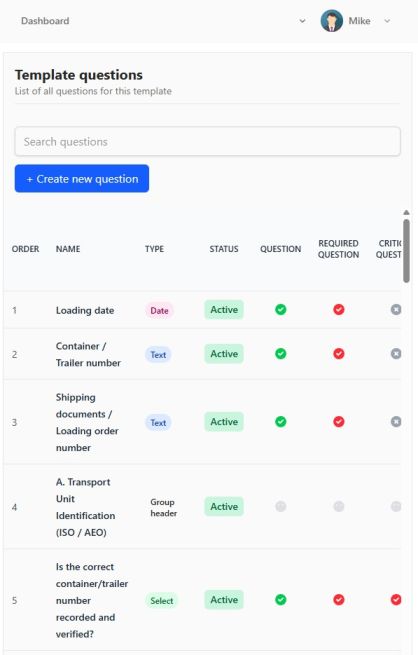
Templates, teams, and role-based control
Create multiple teams, assign viewer/member/manager/admin roles, and manage account-wide templates from one place. Import from library or create your own template when your plan allows it.
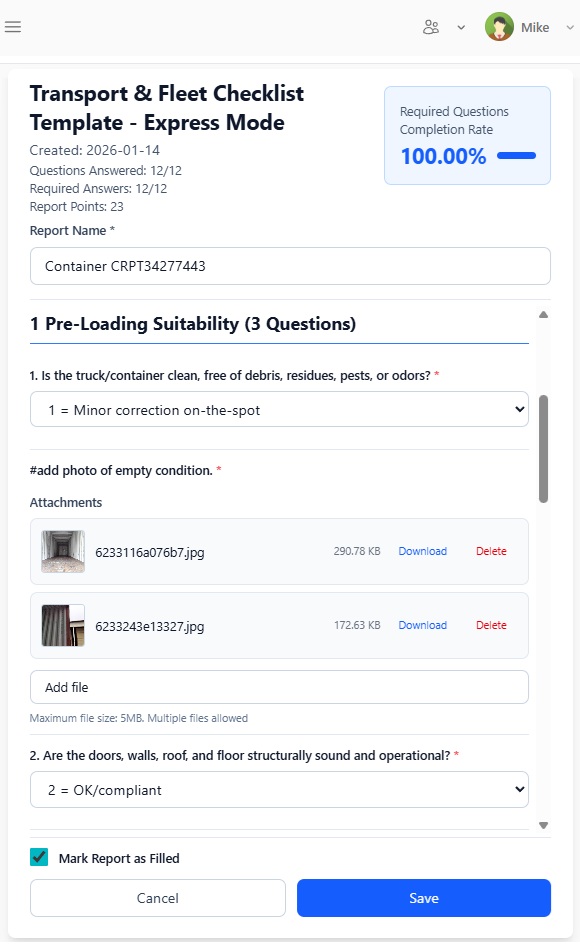
Checklist logic that drives action
Define required and critical questions, expected answers, and automated follow-up tasks. For small issues, teams can apply quick fixes immediately and keep the process moving.
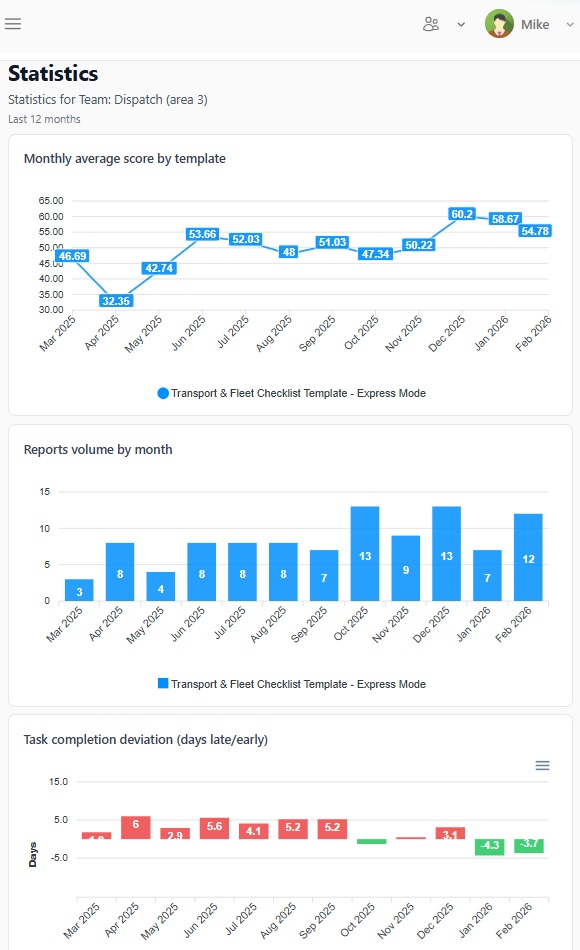
Follow scores and measurable improvement
Track checklist completion, failed critical checks, score development, task performance, completion speed, and overdue rates across yearly, quarterly, monthly, or weekly views.
Why to start structured collection of observations?
Full visibility
Gain insights into operations with comprehensive data collection and reporting.
Proactive improvement
Identify and address issues before they escalate into bigger problems.
Team engagement
Empower your team to contribute to continuous improvement efforts.
Data-driven decisions
Make informed decisions based on real-time data and trends.
Resources to get started faster
Template library
Browse free observation templates
Explore templates for Fire Safety Observation, Process Efficiency Observation, Product Quality Observation and more.
Guide
Read the Observation Management in a Modern Organization
Learn practical rollout patterns for adoption, scoring, and long-term process discipline in SME operations.
Plans
Compare plans before upgrade
Start free, test the flow, then unlock template editing and advanced capabilities when your team is ready.
FAQ
Can I use observations for free?
Yes. The free account gives access to the observation module and templates, with up to 2 teams and 5 members. You can test the full workflow and see on how the workflow can support your operations. You can delete your account or upgrade at any time to unlock additional features.
Can I customize templates on the free plan?
Free accounts can import templates, but cannot edit imported templates or create custom ones. Upgraded plans unlock template editing and creation.
How do corrective actions work?
If an answer does not match accepted criteria that is defined in the template, system will require a follow-up task. Tasks can be assigned to team members, and for minor non-conformities, users can apply registered quick fixes to keep the process moving. Teams update task progress through status stages until a final closure.
Does Amphory include other modules?
Yes. Beyond observations, it includes modules for checklists and incidents, each with dedicated templates and closure logic for safer, more reliable operations.
Start improving daily with structured observations
Create a free account, test real templates, and see how built-in corrective actions help your teams close issues faster.
Explore related modules for end-to-end improvement:
Checklists, Incidents, and Root-Cause Analysis